One environment per pull request
The fadebox CLI in GitHub Actions and GitLab CI: an instance per pull request on its own URL, the suite reporting what it found, torn down when the PR closes.
A pull request opens and, a few minutes later, its own copy of the application is running on its own URL: this commit’s image, the real database, the real neighbours. The test suite runs against it and writes what it found onto the instance, where the reviewer looks. Somebody opens the URL and clicks through the change. The pull request merges, and the copy is gone.
That is the loop this post wires up, twice: once as a GitHub Actions workflow, once as GitLab CI.
The Fadebox side of it is four commands of the fadebox CLI, and it is the
same four in both, so the pipeline files differ only in how each system spells pull request,
secret and when the branch closes.
It assumes an environment already composed in Fadebox — the
previous post built one — and a project with a dev
environment whose web service is the application. Everything below runs as a service
account, not as you.
Three things to set up once
A key for the pipeline. A pipeline authenticates with an API key that belongs to a
service account: a user with roles but no password, whose instances are owned by the account
rather than by whoever last pushed. A project maintainer creates one on the project’s API Keys
page; the default role it grants is deployer, which is the whole instance lifecycle — create,
deploy, stop, delete, status, logs, and the checks below — and nothing about the environment’s
definition. The token is shown once. Put it in the CI secret store and nowhere else. The rules
are on API keys.
A service the pipeline may pin. A pull request wants to run its build of the application,
not whatever tag the environment says. Rather than letting the pipeline edit the environment —
which would change every instance of it, and needs a maintainer key — an editor opens the
web service for image tags once, on the environment page. From then on a deployer can set
the tag per instance, which is exactly the grain a pull request is. That is
what a deployer may change;
the pipeline’s registry has to be one the runtime can pull from, see
private registries.
Healthchecks on the template. --wait below returns when the instance is RUNNING, and
RUNNING means exactly what the template’s healthchecks make it mean: a service with one counts
as ready when it turns healthy, a service without one the moment it starts. A suite that fires
the instant the deploy returns needs the application to have a healthcheck, or it will hit a
port nobody is listening on yet. Healthchecks earn their keep.
The four commands
The CLI is a single Linux binary that every Fadebox server hands out itself, so a job fetches it from the server it is about to drive and always has the matching version. No key is needed for the download:
curl -fsSL -o /usr/local/bin/fadebox "$FADEBOX_URL/cli/fadebox-linux-amd64"
chmod +x /usr/local/bin/fadebox
It reads its settings from the environment — FADEBOX_URL, FADEBOX_TOKEN, FADEBOX_PROJECT,
FADEBOX_ENV — so a job writes no config file and the token never touches disk.
1. Bring the instance up.
fadebox instance up "pr-42" --wait --print-token -o json \
  --tag "web=$COMMIT_SHA" \
  --purpose "Discount codes on checkout" \
  --link "PR #42=https://github.com/acme/shop/pull/42" \
  > deploy.json
up is find-or-create: the first run of a pull request creates pr-42, every later push redeploys
it. --wait polls until the deploy settles, prints per-container progress to stderr while you
watch the job log, and exits 1 with the reason if it ends in ERROR — so a broken deploy fails
the job at the right step, with the message a person would otherwise have to open the UI to see.
--tag web=… pins this commit’s image on the open web service. --purpose and --link say
what the copy is for, so the instance list reads Discount codes on checkout with the pull
request one click away instead of a wall of pr- slugs, and they stick to the instance across
every redeploy.
-o json puts the status document on stdout, and it keys the containers by service, so the
preview URL is one jq away:
URL=$(jq -r '.containers.web.urls[0]' deploy.json)--print-token is for a runtime whose instance URLs sit behind
Require fadebox sign-in: it adds an
accessToken to the document — the cookie name and one value per hostname — which the test
runner sets before its first request. On an ungated runtime the key is there with an empty list,
so the step needs no condition around it.
2. Run the suite against it. That part is yours — Playwright, Cypress, a curl smoke, a
load test. It gets URL, and where the runtime gates the URL, the cookie from deploy.json.
3. Report what it found.
fadebox instance check pr-42 e2e --state passed \
  --summary "84 passed, 0 failed" --run-url "$JOB_URL"
A check is a named result — e2e, smoke, perf — with a state, a one-line summary and a
link to the run. It lands on the instance’s running deploy attempt, not on the instance: the
next push starts a new attempt with no checks, and the previous attempt keeps its own, which is
the answer to but it passed yesterday. Reporting the same name again replaces it, so a job can
say pending when it starts and passed or failed when it ends. The card shows the checks as
badges, and the attempt’s page shows the summary and the link.
Checks and the verdict has the rules.
4. Take it down when the pull request closes.
fadebox instance stop pr-42 --wait
fadebox instance delete pr-42
Not at the end of the test job. A copy that is stopped three seconds after the suite passes
leaves nothing for the reviewer to open, and the checks were written for a reviewer. The
teardown belongs on the merge or close event. What keeps forgotten copies from piling up in the
meantime is the instance’s expiry: every deploy re-arms it, a
branch that goes quiet is stopped when it runs out, and fadebox instance get prints when that
is.
GitHub Actions
One workflow, two jobs: preview runs on every push to the pull request, teardown once when
it closes. FADEBOX_TOKEN is a repository secret; the address and the project are variables.
The job’s environment is what makes GitHub show a View deployment button on the pull
request, pointing at the URL the deploy printed.
name: Preview environment

on:
  pull_request:
    types: [opened, synchronize, reopened, closed]

env:
  FADEBOX_URL: ${{ vars.FADEBOX_URL }}
  FADEBOX_TOKEN: ${{ secrets.FADEBOX_TOKEN }}
  FADEBOX_PROJECT: shop
  FADEBOX_ENV: dev
  INSTANCE: pr-${{ github.event.number }}

jobs:
  preview:
    if: github.event.action != 'closed'
    runs-on: ubuntu-latest
    environment:
      name: pr-${{ github.event.number }}
      url: ${{ steps.up.outputs.url }}
    steps:
      - uses: actions/checkout@v4

      # … build this commit's image and push it as ghcr.io/acme/shop-web:${{ github.sha }} …

      - name: Fetch the CLI from the server it drives
        run: |
          curl -fsSL -o /usr/local/bin/fadebox "$FADEBOX_URL/cli/fadebox-linux-amd64"
          chmod +x /usr/local/bin/fadebox

      - name: Bring the instance up
        id: up
        env:
          PR_TITLE: ${{ github.event.pull_request.title }}
          PR_URL: ${{ github.event.pull_request.html_url }}
        run: |
          fadebox instance up "$INSTANCE" --wait --print-token -o json \
            --tag "web=${{ github.sha }}" \
            --purpose "$PR_TITLE" \
            --link "PR #${{ github.event.number }}=$PR_URL" \
            > deploy.json
          echo "url=$(jq -r '.containers.web.urls[0]' deploy.json)" >> "$GITHUB_OUTPUT"

      - name: Run the suite
        env:
          BASE_URL: ${{ steps.up.outputs.url }}
        run: |
          # on a gated runtime, deploy.json's .accessToken is the cookie to set on $BASE_URL
          npm ci
          npx playwright test

      - name: Report what the suite found
        if: always()
        run: |
          fadebox instance check "$INSTANCE" e2e \
            --state "${{ job.status == 'success' && 'passed' || 'failed' }}" \
            --summary "Playwright, run ${{ github.run_number }}" \
            --run-url "${{ github.server_url }}/${{ github.repository }}/actions/runs/${{ github.run_id }}"

  teardown:
    if: github.event.action == 'closed'
    runs-on: ubuntu-latest
    steps:
      - name: Stop and delete the instance
        run: |
          curl -fsSL -o /usr/local/bin/fadebox "$FADEBOX_URL/cli/fadebox-linux-amd64"
          chmod +x /usr/local/bin/fadebox
          fadebox instance stop "$INSTANCE" --wait
          fadebox instance delete "$INSTANCE"
Two things worth noticing. The pull request’s title goes through an environment variable rather
than straight into the run script — a title is text somebody typed, and a $(...) in it would
otherwise run. And the report step is if: always(): a red suite is exactly the case the check
exists for, and job.status is what turns it into failed on the card.
If a pull request closes before it ever had a preview — a draft closed unread — the teardown’s
stop answers with a not-found and the job goes red. continue-on-error: true on that step is
the honest fix if it bothers you; the job is telling the truth either way.
GitLab CI
The same loop as three jobs and a fourth for the stop, with GitLab’s own environment machinery
doing the bookkeeping: environment with a dynamic url puts a View app button on the merge
request, on_stop names the job that tears it down, and auto_stop_in runs that job by itself
when the branch goes quiet — belt and braces beside Fadebox’s own expiry. FADEBOX_TOKEN is a
masked, protected CI/CD variable.
stages: [build, preview, test, cleanup]

variables:
  FADEBOX_URL: https://fadebox.example.com
  FADEBOX_PROJECT: shop
  FADEBOX_ENV: dev
  INSTANCE: mr-$CI_MERGE_REQUEST_IID

.cli:
  before_script:
    - curl -fsSL -o /usr/local/bin/fadebox "$FADEBOX_URL/cli/fadebox-linux-amd64"
    - chmod +x /usr/local/bin/fadebox

# … a build job that pushes $CI_REGISTRY_IMAGE/web:$CI_COMMIT_SHA …

preview:
  stage: preview
  extends: .cli
  rules:
    - if: $CI_MERGE_REQUEST_IID
  script:
    - |
      fadebox instance up "$INSTANCE" --wait --print-token -o json \
        --tag "web=$CI_COMMIT_SHA" \
        --purpose "$CI_MERGE_REQUEST_TITLE" \
        --link "MR !$CI_MERGE_REQUEST_IID=$CI_MERGE_REQUEST_PROJECT_URL/-/merge_requests/$CI_MERGE_REQUEST_IID" \
        > deploy.json
    - echo "PREVIEW_URL=$(jq -r '.containers.web.urls[0]' deploy.json)" > preview.env
  artifacts:
    reports:
      dotenv: preview.env
    paths: [deploy.json]
  environment:
    name: review/$CI_COMMIT_REF_SLUG
    url: $PREVIEW_URL
    on_stop: stop_preview
    auto_stop_in: 1 week

e2e:
  stage: test
  extends: .cli
  needs: [preview]
  rules:
    - if: $CI_MERGE_REQUEST_IID
  script:
    # PREVIEW_URL comes from the dotenv report; deploy.json carries the cookie on a gated runtime
    - npm ci
    - BASE_URL=$PREVIEW_URL npx playwright test
  after_script:
    - |
      [ "$CI_JOB_STATUS" = success ] && STATE=passed || STATE=failed
      fadebox instance check "$INSTANCE" e2e --state "$STATE" \
        --summary "Playwright, job $CI_JOB_ID" --run-url "$CI_JOB_URL"

stop_preview:
  stage: cleanup
  extends: .cli
  rules:
    - if: $CI_MERGE_REQUEST_IID
      when: manual
  variables:
    GIT_STRATEGY: none
  script:
    - fadebox instance stop "$INSTANCE" --wait
    - fadebox instance delete "$INSTANCE"
  environment:
    name: review/$CI_COMMIT_REF_SLUG
    action: stop
after_script runs whether the script passed or not, and CI_JOB_STATUS inside it is how the
check learns which. The CLI is fetched again there by before_script, which is the point of the
.cli template: every job that talks to Fadebox extends it and nothing is assumed about the
runner’s image.
What the reviewer sees
The instance’s card on the environment page: the title of the pull request as its purpose, the
link to it, the image tag it runs, the checks as badges — green e2e, or red — and a history
chip. Open the URL, click through the change; on a gated runtime, sign in once.
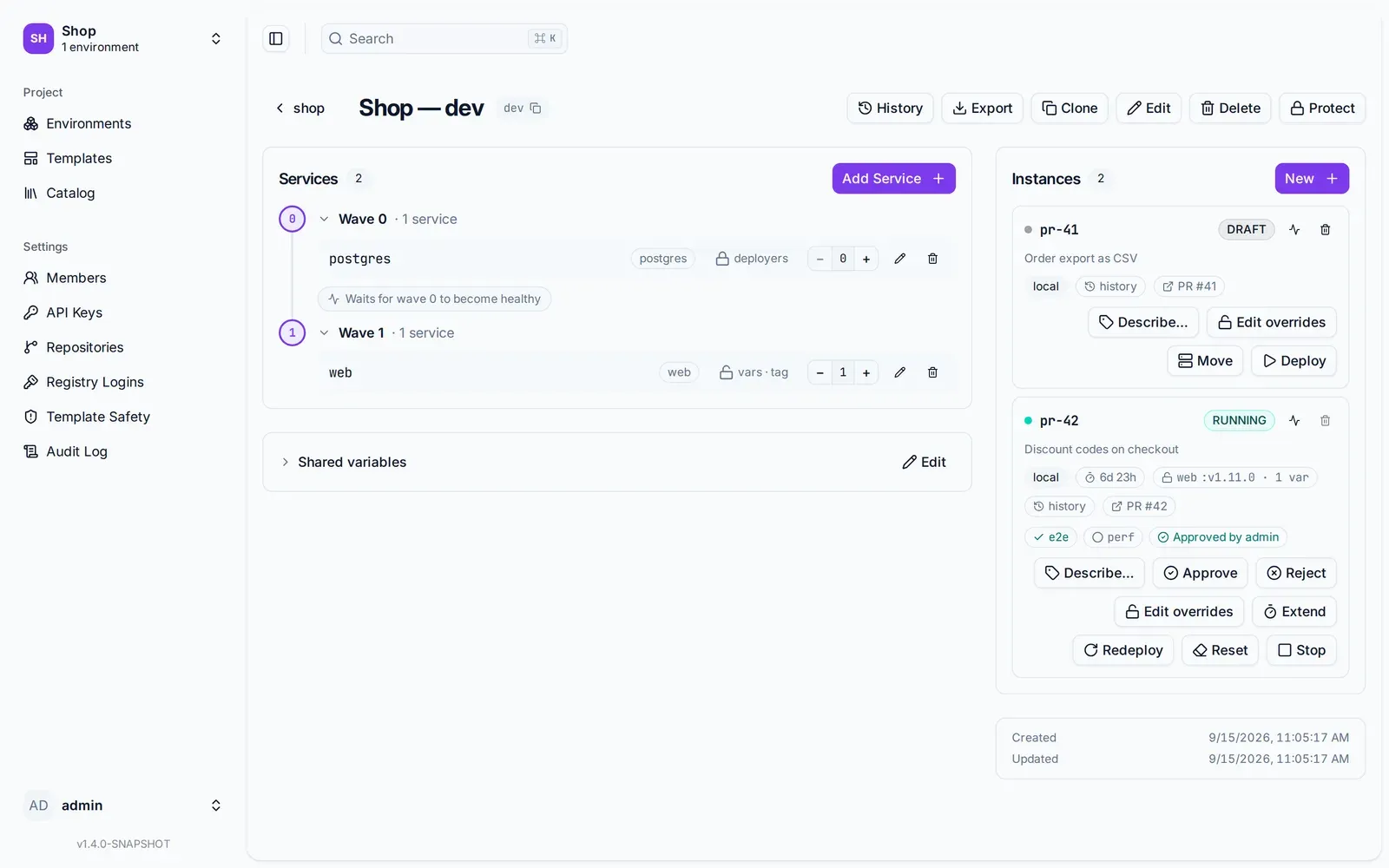
The card the reviewer lands on. The purpose and the link came from --purpose and --link, the tag from --tag, the two checks from instance check, and the approval from a person.
The history is where a pipeline’s work pays off. Every push was a deploy attempt, and each
attempt kept what it ran: the image, the commit each git reference resolved to, and the checks
reported on it. The attempt’s page leads with what changed since the attempt before —
web :1a2b3c4 → :5d6e7f8, a variable, a service that arrived — and any two attempts can be
compared, with the choice in the URL. So it passed yesterday and fails today is a link to a
page that says what differs. Deploy history describes
it.
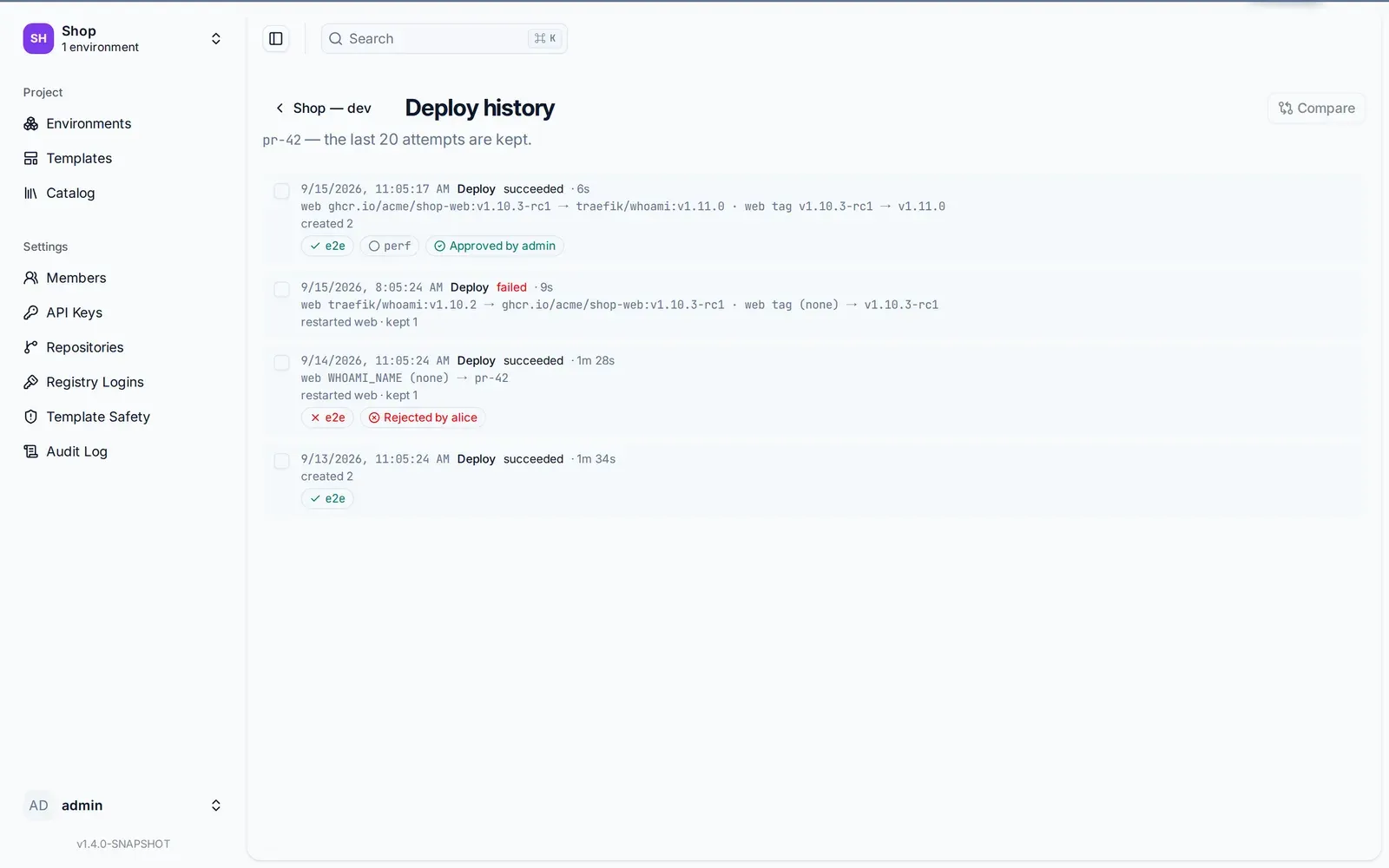
Every push is a row. The failed attempt tried a tag the registry did not have; the one before it was rejected with a note; the newest carries the pinned tag, the passing suite and the approval.
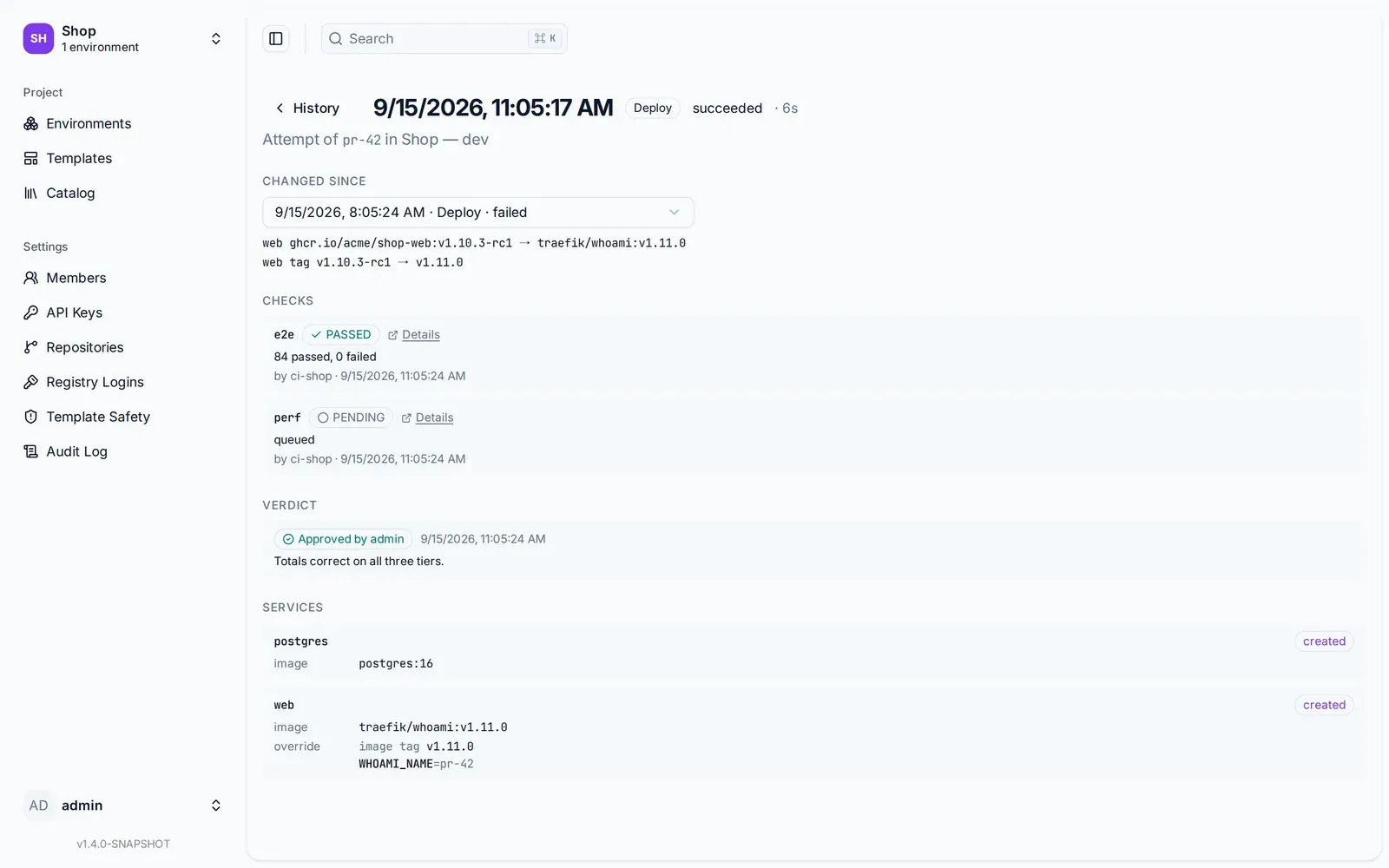
The attempt itself. The override block is what the pipeline actually ran with — image tag v1.11.0, WHOAMI_NAME=pr-42 — not what the instance’s overrides say today.
And the last word is a person’s. fadebox instance approve pr-42 --note "Totals correct on all three tiers" — or the same from the card — records a verdict beside the checks, on the same
attempt, so an approved never outlives the build it approved. A rejection must carry its note;
that note is the review comment, written where the thing it is about can still be opened.
The rules that bite
upis safe to retry. A re-run of a failed job redeploys the samepr-42rather than creatingpr-42-2.- The tag lands on the instance, nothing else.
--tag web=…sets an override on this instance; the environment and the other instances keep their own. It works only on a service an editor has opened for it — otherwise the call is refused, which is the environment saying what it lets a pipeline vary. - A
deployerkey is enough. It creates, deploys, pins, reports and tears down. Only a pipeline that must rewrite the environment’s definition needs more, and the point of the open service is that it does not have to. --waithas a--timeout, ten minutes by default. A stack that takes longer to come up wants a longer one, not a retry loop around the command.- The expiry is the safety net, the close event is the plan. Deploying re-arms the lifetime; an instance nobody pushes to for a while stops on its own. The teardown job is still the thing that deletes it.
The same four commands drive any other CI — Jenkins, Drone, a cron job on a VM — and the REST
API behind them is plain enough for curl, which the API keys guide
shows in full.