BlogGetting started with Fadebox, part 2 of 2
Your first environment: PetClinic on Fadebox
A database from the catalog, a template you write for a real app, an environment composing both, and an instance on a URL. Plus: templates versus the catalog.
The previous post left Fadebox running on your machine with a runtime that routes by name and
a project called demo. This one builds on it. By the end, Spring PetClinic, the sample
application every Java developer has seen at least once, is running against PostgreSQL in an
instance you created, at a URL you can open. Then a second one beside it.
Everything here happens inside the project, with a project role. Nothing touches a global setting.
If you skipped the first post: you need Fadebox installed, a runtime with the ingress domain
localtest.me, and a project demo in which you are a maintainer.
Templates and the catalog are different things
Fadebox has two nouns that new users blur together, and the distinction is worth two minutes because everything else rests on it.
A template is a service described as Docker Compose YAML: one main container plus, optionally, its helpers, with a healthcheck, volumes and the files Fadebox injects at deploy time. It lives in your Fadebox, in the database, and it is yours: you edit it, you version it, you decide who sees it. A template is either global, visible to every project, or scoped to one project, where that project’s maintainers own it. Infrastructure blocks tend to be global. Your own application’s template belongs with its project.
The catalog is where ready-made templates come from. It is a browse-and-import surface, not a place anything runs from. Fadebox ships with a bundled catalog of curated entries, PostgreSQL, Redis, Keycloak, Kafka, RustFS, Mailpit and some twenty more, baked into the image so it works offline. Beside it you can register your own catalog sources: git repositories in the same format, which is how a platform team publishes the company’s building blocks.
The relationship between the two is copy-on-import. Importing an entry snapshots it into an ordinary, editable template under a name and scope you choose. There is no live link. A catalog that changes, breaks or disappears can never reach a template you imported, let alone a running instance. What the copy keeps is provenance: which source, which entry, which version. When the catalog moves on, the template shows an update available badge, and updating it is an explicit act that you confirm, never something that happens to you.
So: a template is the thing you compose environments from. The catalog is one of two ways to get a template, the other being to write it. This post does both.
1. Import PostgreSQL from the catalog
Open the project’s Catalog page and find PostgreSQL. Click import. The dialog asks for a
name and a slug; keep the suggested postgres. Because you imported from the project’s own
catalog page, the copy lands in the project, and a maintainer needs no global role to do it.
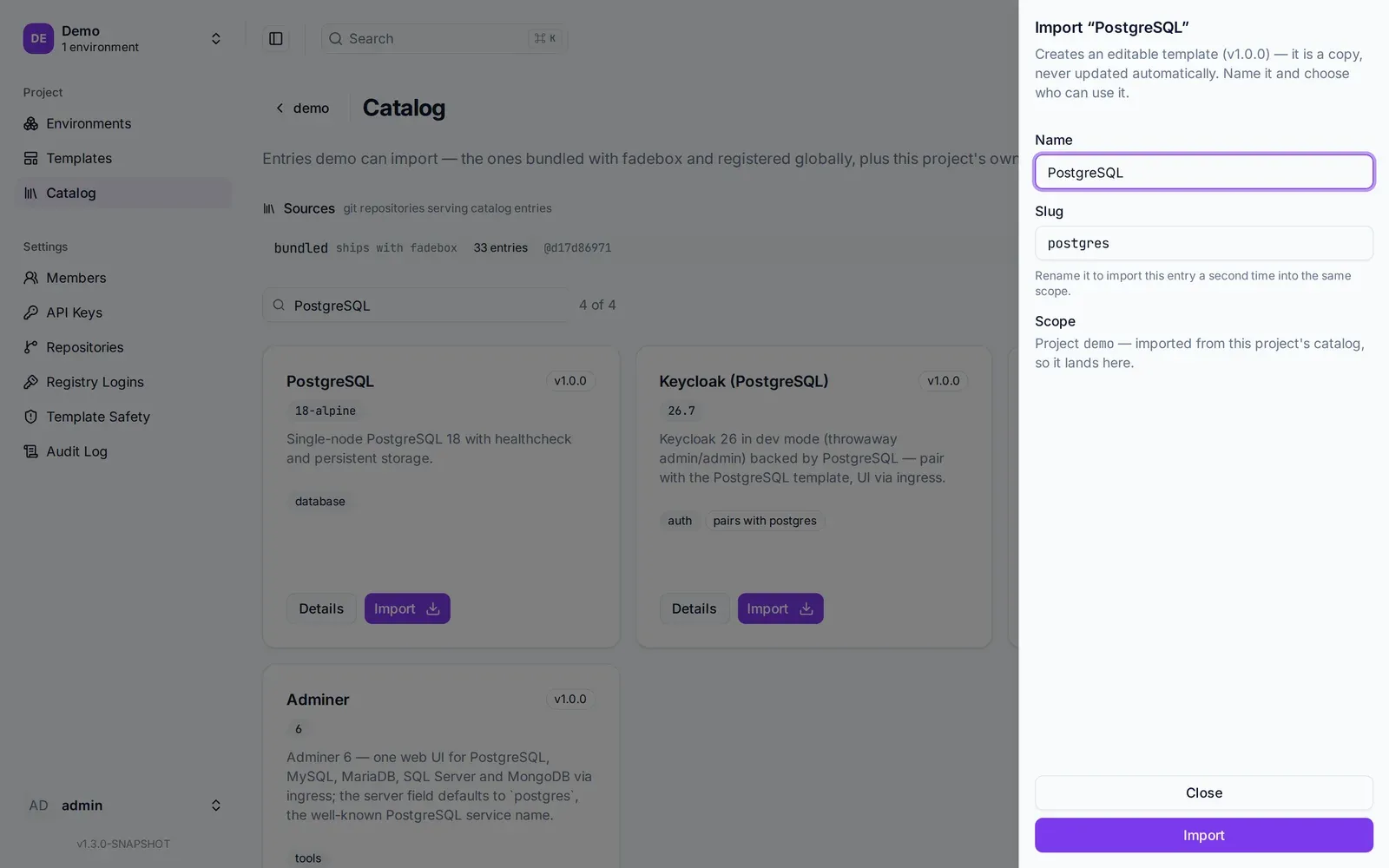
Import is a copy. The drawer says so, and the scope is the project because that is where you opened the catalog.
The entry you just copied is worth reading once, because it is the pattern your own templates will follow:
services:
  postgres:
    image: postgres:18-alpine
    environment:
      POSTGRES_USER: postgres
      POSTGRES_PASSWORD: postgres
      POSTGRES_DB: postgres
    volumes:
      - postgres-data:/var/lib/postgresql/18/docker
    healthcheck:
      test: [ "CMD-SHELL", "sh -c 'pg_isready -U $POSTGRES_USER -d $POSTGRES_DB'" ]
      start_period: 20s
      interval: 5s
      timeout: 5s
      retries: 12
Plain Compose. A pinned image tag, a named volume, and a healthcheck with a realistic start period. The healthcheck is not decoration: it is what lets the next step say “start the application after the database is ready” and mean it. The credentials are throwaway and stated in the open, which is right for an ephemeral environment and wrong for anything else.
2. Write a template for PetClinic
Now the other way to get a template. Go to the project’s Templates page and create one. Name it
PetClinic, slug petclinic. The create form offers Start from skeletons for Spring Boot,
Quarkus and Rails; PetClinic is Spring Boot, but the template is short enough to type, so paste
this into the spec editor:
services:
  petclinic:
    image: springcommunity/spring-petclinic:3.5.6
    environment:
      SPRING_PROFILES_ACTIVE: postgres
      POSTGRES_URL: jdbc:postgresql://{{service.postgres.host}}:5432/{{service.postgres.env.POSTGRES_DB}}
      POSTGRES_USER: "{{service.postgres.env.POSTGRES_USER}}"
      POSTGRES_PASS: "{{service.postgres.env.POSTGRES_PASSWORD}}"
    labels:
      fadebox.ingress.port: "8080"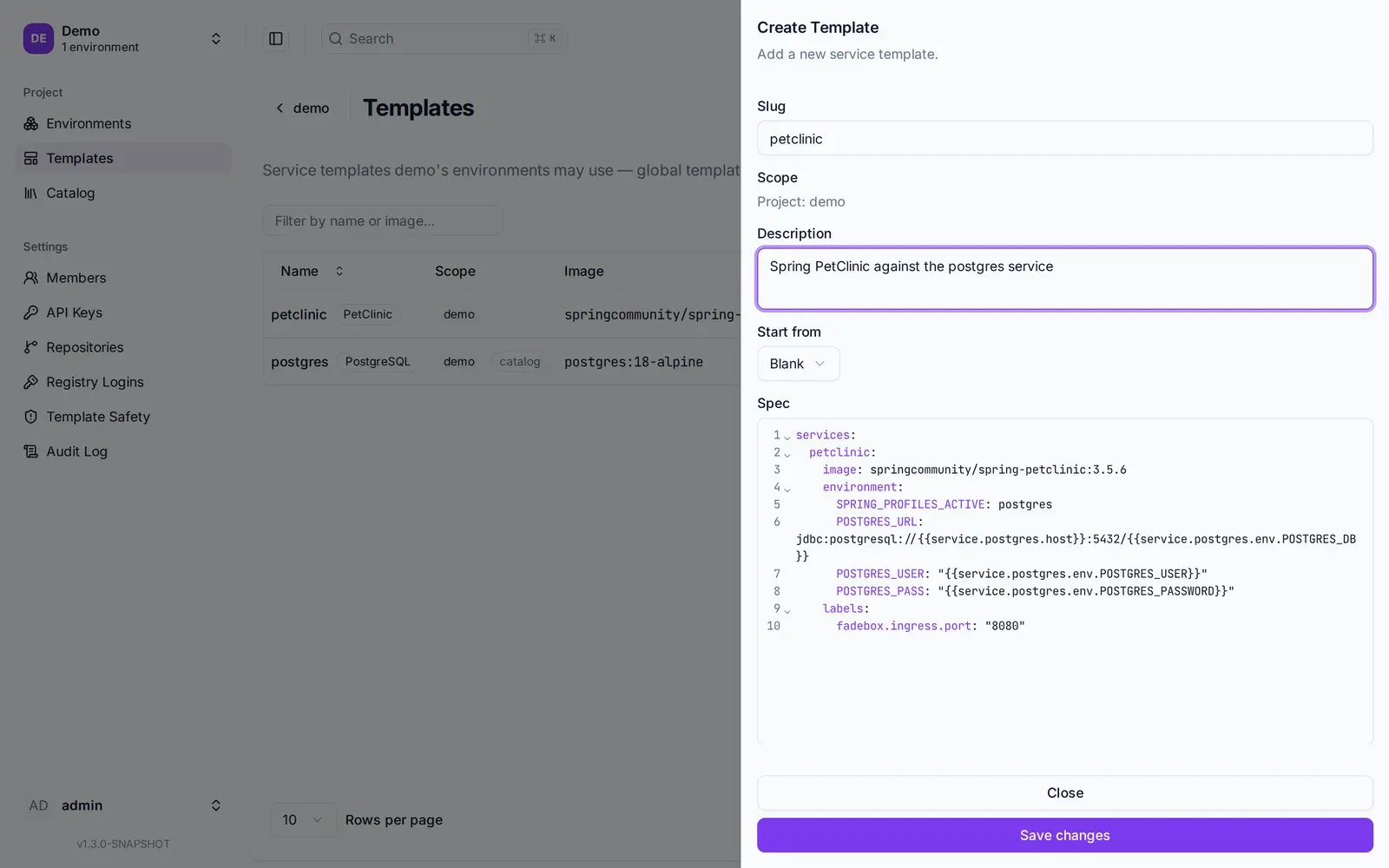
The template editor with the spec above. The Start from menu offers Spring Boot, Quarkus and Rails skeletons for your own application.
Three things in it are Fadebox rather than Compose, and they are the whole lesson.
The image is pinned. 3.5.6, not latest. An untagged reference makes the daemon pull every
tag, and a moving one makes two instances of the same environment run different code. The tag can
be overridden per environment later, which is how dev and staging share this template and run
different versions.
The database is wired by reference, not by literal. {{service.postgres.host}} resolves at
deploy time to the in-instance hostname of whichever environment service is named postgres, and
{{service.postgres.env.POSTGRES_DB}} to the effective value of that variable on it, overrides
included. If someone later changes the database password on the environment, PetClinic follows.
If the environment has no service called postgres, the deploy fails with a message that says so,
instead of an application that starts and then cannot connect. The spec editor completes these
references as you type, so you do not write them from memory.
One label asks for a URL. fadebox.ingress.port: "8080" says “this service speaks HTTP on
8080, give it a hostname”. There is no ports: entry and there should not be one: the ingress
reaches the container over the Docker network, and a host-bound port is what a second instance
would collide on.
One thing is missing, and deliberately. There is no healthcheck. The PetClinic image is built with
Cloud Native Buildpacks and ships no shell, no curl and no wget, so there is nothing inside the
container to run a probe with. That is common for modern JVM images and worth knowing before it
bites you on your own. The consequence here is small: a service without a healthcheck counts as
ready when it has started, and since nothing starts after PetClinic, nothing waits on it. For your
own application, pick a run image with curl in it and probe the actuator; the Spring Boot
skeleton in the create form has that healthcheck written out.
Save it. Fadebox parses the spec on the way in and reads it back: which service is the main one, which ports the ingress will publish, which references it carries. An unsupported Compose key is a hard error rather than a silent drop, because a silently ignored key is a deploy that quietly does the wrong thing.
3. Compose the environment
An environment composes templates into an application stack. It belongs to the project and it is a pure definition: creating one starts nothing.
Go to the project’s Environments page and create a new one. The page has three columns: the templates you can add on the left, the environment you are building in the middle, and what happens when you press the button on the right.
Name it Dev; the slug becomes dev. Click PostgreSQL and PetClinic in the left column.
Each becomes an environment service in the middle, named after its template: postgres and
petclinic. That name is what siblings resolve over the network and what prefixes the container
name, and postgres is exactly the name the PetClinic template’s references expect. Had you
named it db, the middle column would already be telling you that petclinic references a
service not in this environment yet.
Set the waves: postgres in wave 0, petclinic in wave 1. Services in a wave start together,
and a wave does not begin until the previous one is ready, where ready means healthy for services
with a healthcheck. That number is how a database is guaranteed to accept connections before the
application that needs it, with no wait-for-it script anywhere.
The right column decides what the button does. Definition only creates the environment and leaves
instances for later. Choose Create & deploy instead, name the instance pr-42, confirm the
runtime is local, and press it.
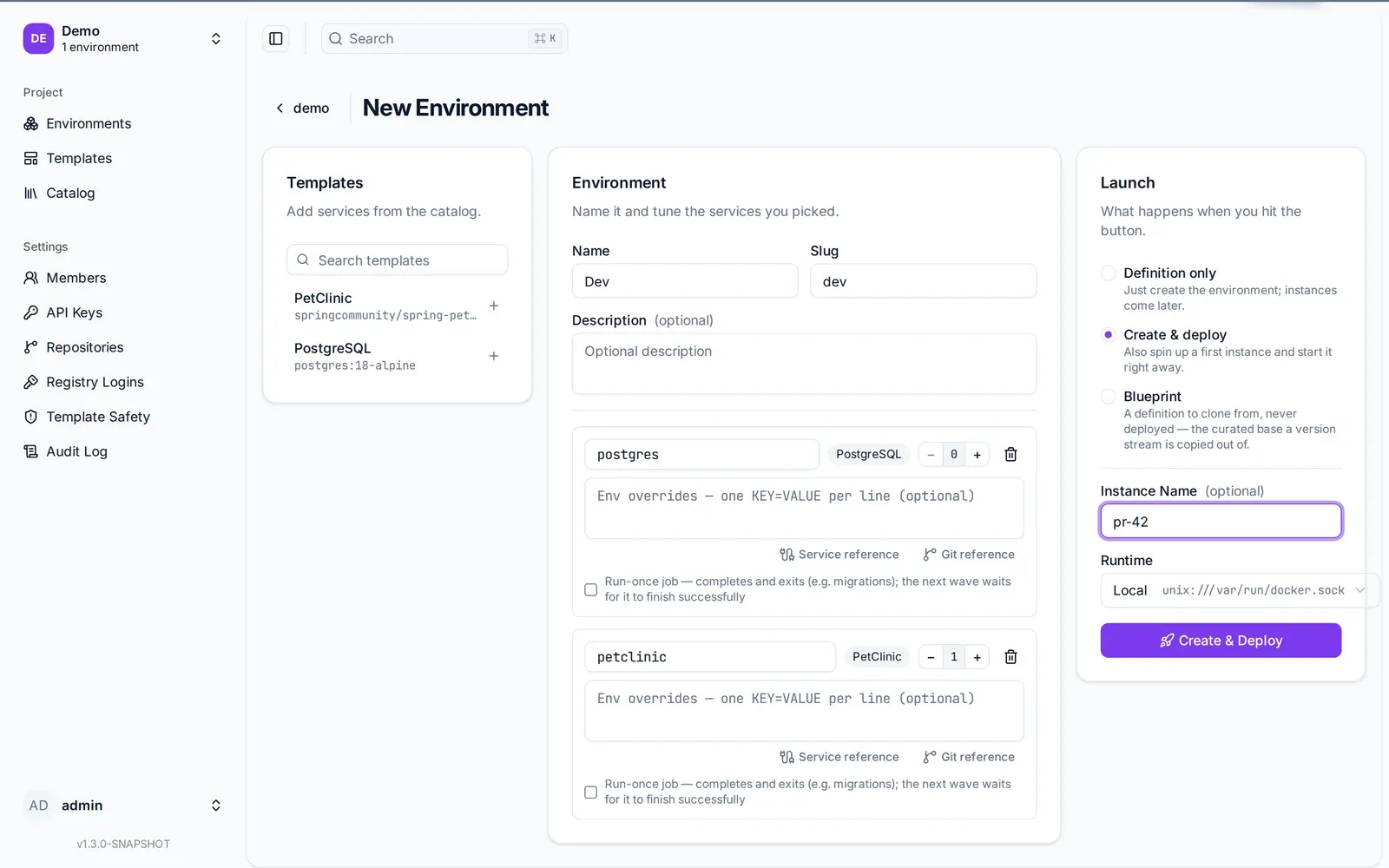
One page, three columns. The wave numbers next to each service are the whole start-order story.
4. Watch the instance come up
An instance is a running copy of an environment on a runtime. The deploy runs in the background; open the instance and the status panel fills in per container as the daemon reports it: pulled, created, started, healthy. Fadebox keeps no copy of that state. The daemon is the source of truth, which is why running instances survive a Fadebox restart.
postgres goes healthy first. Then wave 1 starts, and PetClinic takes a few seconds to create its
schema and seed it. When the instance reaches RUNNING, the panel shows the URL:
http://demo-dev-pr-42-petclinic.localtest.me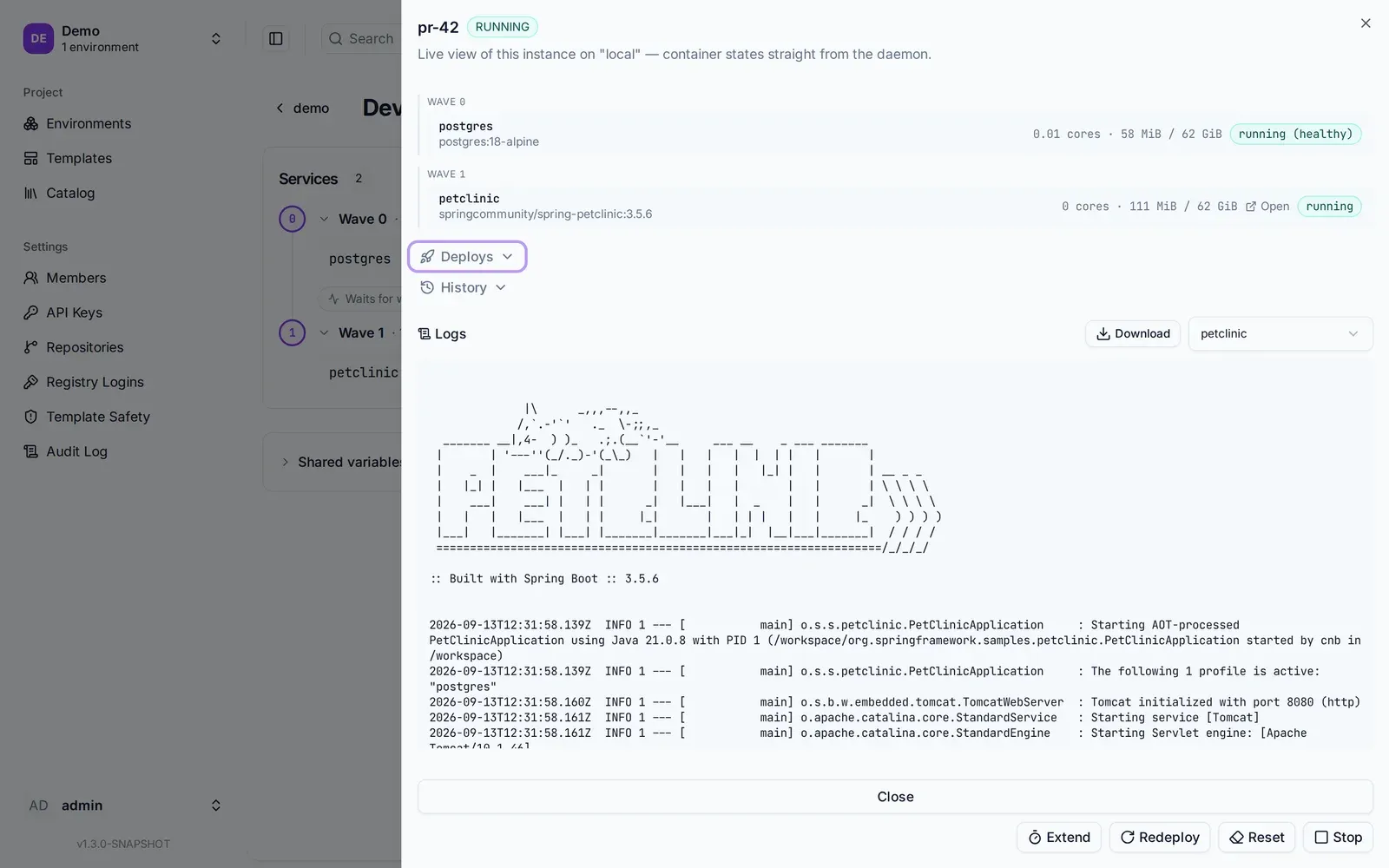
The status panel reads container state straight from the daemon. The Open link next to petclinic is the URL above.
Open it. Click Find owners and search with an empty name: ten owners, their pets, their visits, all read from the PostgreSQL that did not exist a minute ago.
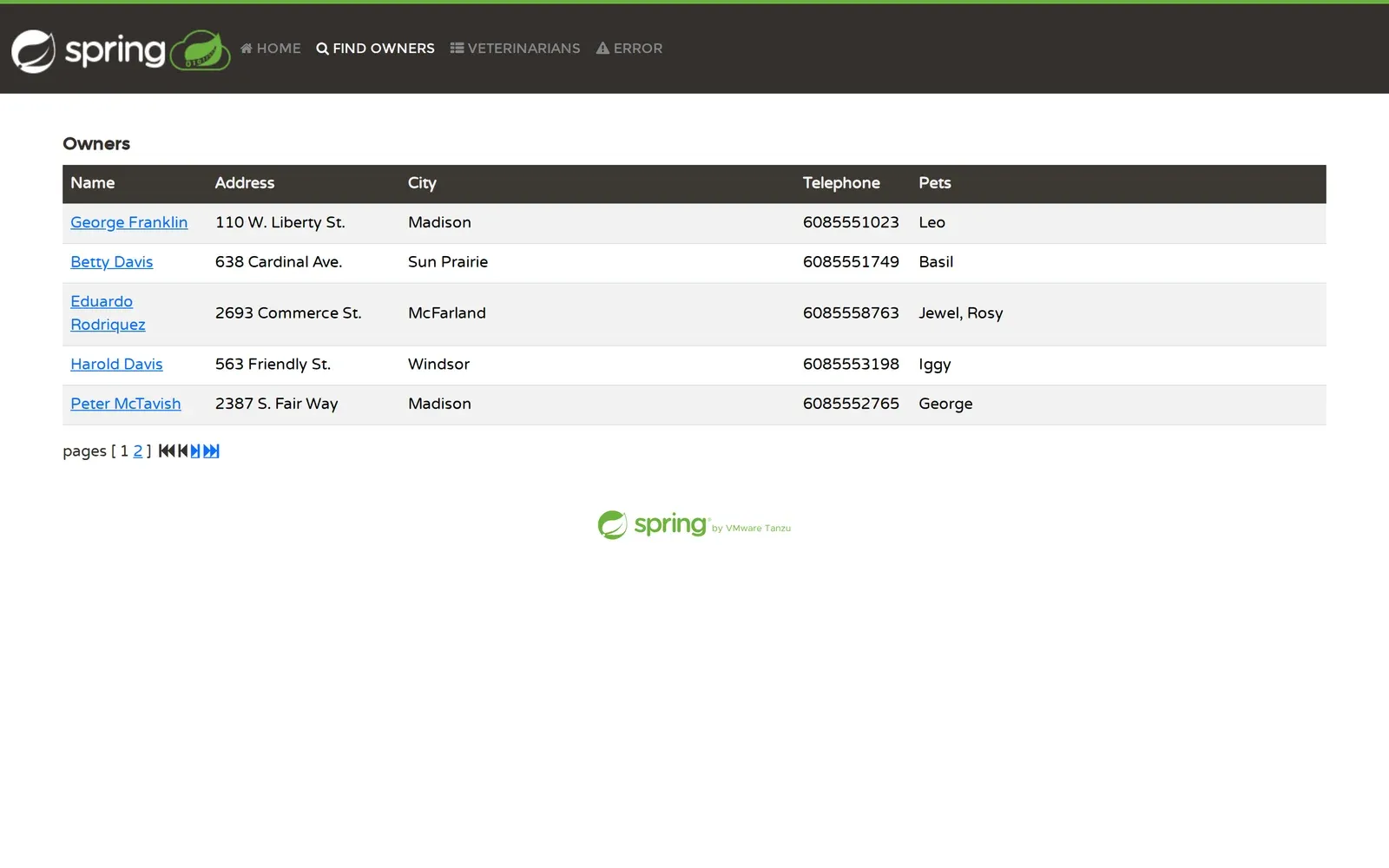
PetClinic answering on its instance hostname, data and all, routed by Traefik on the runtime host. Every container, network and volume
this instance created carries its namespace, demo-dev-pr-42, in its name.
5. Deploy a second one
Back on the environment, create another instance, pr-43, and deploy it. Both are running on your
machine now, on the same Docker daemon, each with its own PostgreSQL and its own data. Nothing is
shared and nothing collides, because everything either instance created is prefixed with its own
namespace. That is the ephemeral part: instances are copies of a definition, not branches of a
shared stack.
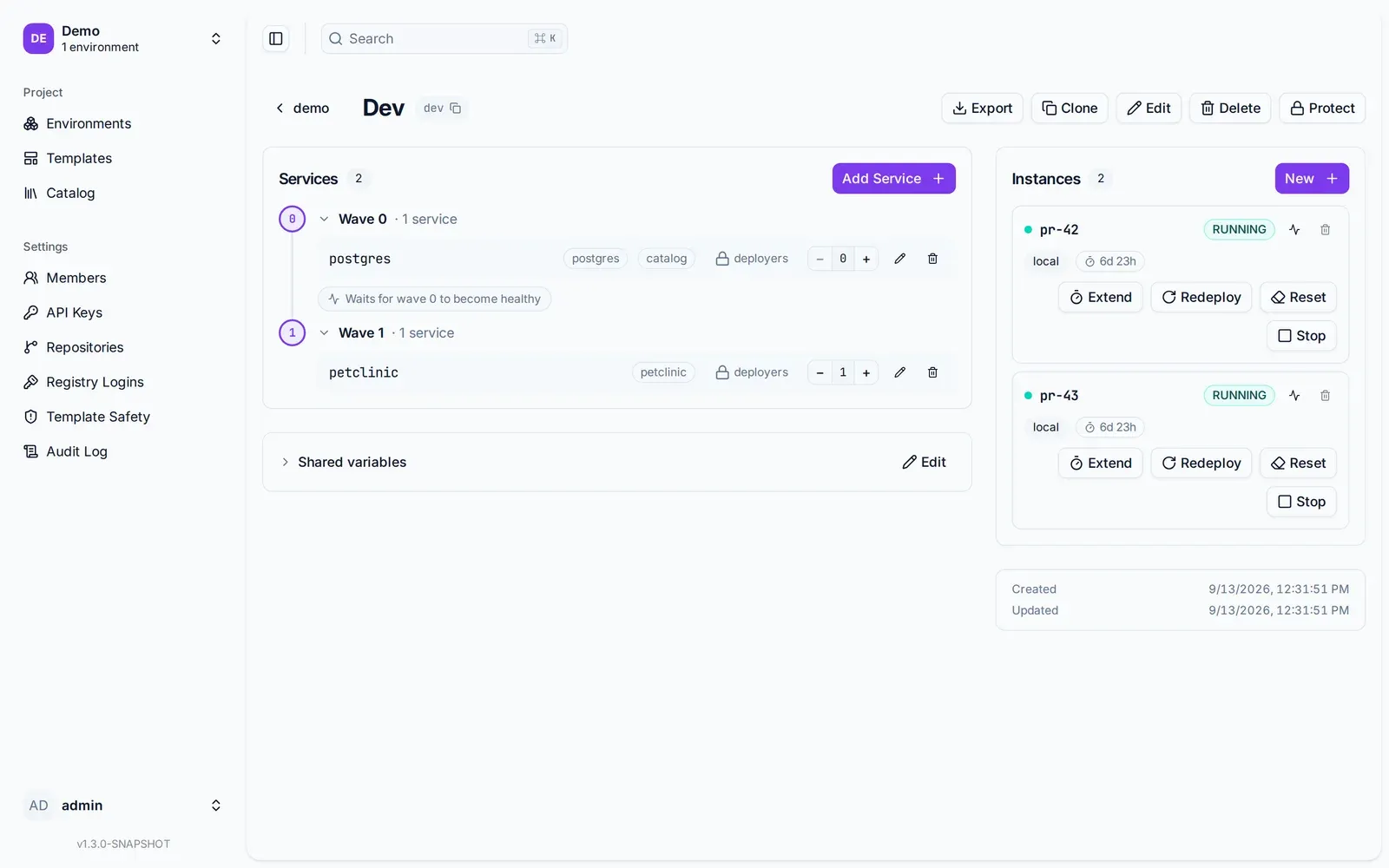
Two running copies of the same definition. Each has its own PostgreSQL, its own network and its own URL.
Add an owner in pr-42. It is not in pr-43. Stop pr-43, redeploy it, delete it. Since Fadebox
1.2 a redeploy restarts only the containers whose definition changed, so bumping PetClinic’s tag on
the environment leaves its database running.
What you built, and what it is called
- Two templates, one imported from the catalog, one written by hand. Both belong to the project and are indistinguishable once saved.
- An environment,
dev, that names two services, wires them by reference and orders them by wave. A definition, nothing more. - Two instances of it, each an isolated running copy with its own URL.
And one thing you did not build: nothing here is coupled to the catalog. Delete the bundled entry,
register a different source, or take Fadebox offline; postgres in this project is a template you
own and deploys as before.
Where to go next
Pin a version. The image tag lives on the environment service, not the template. Clone dev
to dev-3-5-0, set PetClinic’s tag on the copy, and you have two version streams on one template.
Or let the tag come from a file in git, {{git:app-repo:deploy/values.yaml#$.image.tag}}, so a
release is a commit and never a write to Fadebox. The
git value sources guide has it.
Put your own application in. Replace the image with yours, keep the references, add the healthcheck. The authoring guide has the supported Compose subset, the label directives and the init-container pattern for migrations.
Let a pipeline do step 3. Create an API key on the project and the CLI does what you just did by hand, on every pull request:
fadebox instance up pr-123 --waitIt finds or creates the instance, deploys it, waits for the containers to settle and prints the URL to paste into the merge request. The CLI guide covers login, contexts and JSON output.