Local code, remote stack
Your whole stack runs on the team's Docker hosts. Your code, debugger and tools stay on your laptop and reach it on localhost. One CLI, nothing else to install.
Most teams already know the two bad options. Run the whole stack on your laptop and watch it crawl. Or share one staging environment and wait for whoever broke it this morning. Fadebox 1.5 adds a third: a full environment of your own on the team’s hosts, used from your own machine as if it ran next to you.
The laptop that cannot hold the stack
“Pull the latest, run
docker compose up, and give it twenty minutes. If Keycloak doesn’t start, delete the volume and try again.”
Your service needs a PostgreSQL with realistic data, a Keycloak realm with the right clients, a Kafka broker and a search index. Together they eat the memory your IDE wanted. The data is whatever you seeded last month. Every developer’s copy drifts a little further from what the team actually runs.
So you push to a shared environment instead, and your half-finished change meets everyone else’s.
An environment of your own, in one command
The team defines the stack once, as the Compose files it already has. You ask for your own copy:
$ fadebox instance up dev-michal --personal --wait
  postgres: running (healthy)
  keycloak: running (healthy)
  kafka: running (healthy)
instance: RUNNING
Instance 'dev-michal' is RUNNING
It runs on the team’s Docker hosts, at the versions the team runs, with its own data. It’s personal: colleagues can see it, but only you and the project’s editors operate it.
Bring it to localhost
One more command puts every service of your environment on your laptop’s localhost:
$ fadebox connect dev-michal
kafka 9092 → localhost:9092
kafka 19092 → localhost:19092
keycloak 8080 → localhost:8080
keycloak 8443 → localhost:8443
keycloak 9000 → localhost:9000
postgres 5432 → localhost:5432
Press Ctrl-C to stop
Now run the service you’re changing in your IDE, with breakpoints and hot reload, and point it at those ports. Nothing in your configuration says “remote”:
quarkus.datasource.jdbc.url=jdbc:postgresql://localhost:5432/shop
quarkus.oidc.auth-server-url=http://localhost:8080/realms/shop
kafka.bootstrap.servers=localhost:19092
DBeaver, psql, redis-cli and your IDE’s database view work the same way. If a port is taken on
your machine, by a local PostgreSQL for instance, connect picks a free one and remembers it for
that environment, so a saved connection keeps working tomorrow.
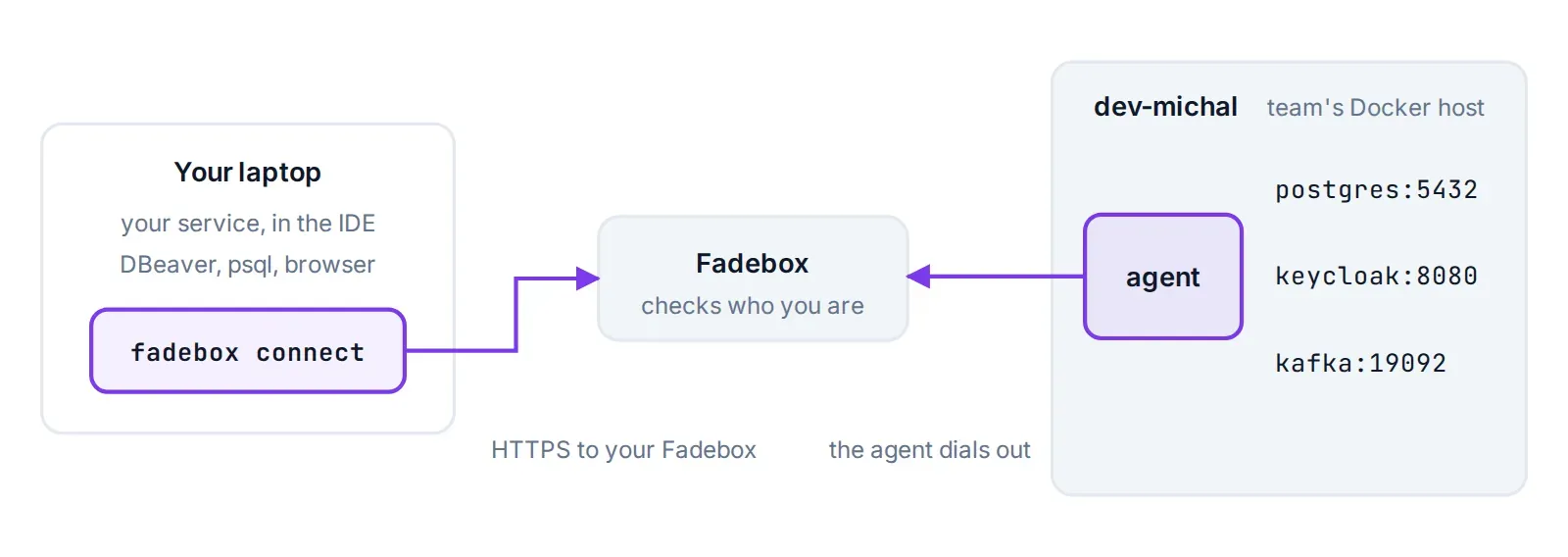
Both ends dial Fadebox; nothing in your environment is published to the network.
Simple on purpose
- One binary on your laptop. The
fadeboxCLI for Linux, macOS or Windows, downloaded from your own Fadebox. No VPN client, no Kubernetes, no file sync. - Your code never leaves your machine. You edit, build and debug locally, with your own tools. Only the dependencies live remotely.
- Plain Docker underneath. The environment is the team’s Compose stack on the team’s Docker hosts. There’s no cluster to learn.
And still featureful
- Data that survives. Redeploy when the team’s versions move: only changed services restart, and your database keeps its data.
- URLs for the web parts. Every HTTP service also gets its own address on your team’s domain, to share with a tester or a reviewer.
- Stable local ports. Remembered per environment and service, so saved connections in DBeaver or IntelliJ keep working.
- Sessions that stay up. An idle
psqlsession survives coffee breaks; Fadebox keeps every tunnel alive through proxies. - Access by your project’s roles. A personal environment admits you and the project’s editors. Every connection is in the audit log.
- Cleans up after itself. An abandoned environment stops when its lifetime runs out, and gives the host’s memory back.
- Several at once. Connect to your own environment and a colleague’s pull request side by side. Each gets its own local ports.
- Your coding agent can drive it. Fadebox speaks MCP, so Claude Code or your IDE assistant can deploy, read logs and diagnose the same environment.
A day with it
09:05 — Start where you left off. fadebox connect dev-michal, then run the service from the
IDE. Yesterday’s data is still there.
10:30 — Step through a token bug. A breakpoint in your OIDC filter, tokens from the team’s real Keycloak realm, no mock server in sight.
13:15 — Pick up the team’s new versions. The team moved Keycloak to a new release. Redeploy
your environment: only Keycloak restarts, PostgreSQL keeps your data, and connect carries on.
$ fadebox instance deploy dev-michal --wait15:40 — Check a reviewer’s question. Connect to the pull request’s own environment next to yours and compare the two tables in one DBeaver window.
18:00 — Go home. Ctrl-C. If you’re on holiday next week, the environment stops on its own when its lifetime runs out.
What it is not
Traffic goes one way: from your laptop into the environment. Services in the environment can’t call back into the copy running in your IDE. So if your service sits in the middle of a call chain, its callers in the environment keep calling the environment’s own copy, not yours. For front ends, for services whose dependencies are databases, brokers and identity providers, and for test and data tools, that’s exactly the shape you want.
Already on Tailscale?
If your team runs Tailscale or Headscale, Fadebox can also give every service of an environment a
fixed address on your tailnet, reachable without connect. Both ways work on the same
environment, and connect uses the tailnet by itself when your laptop is on it.
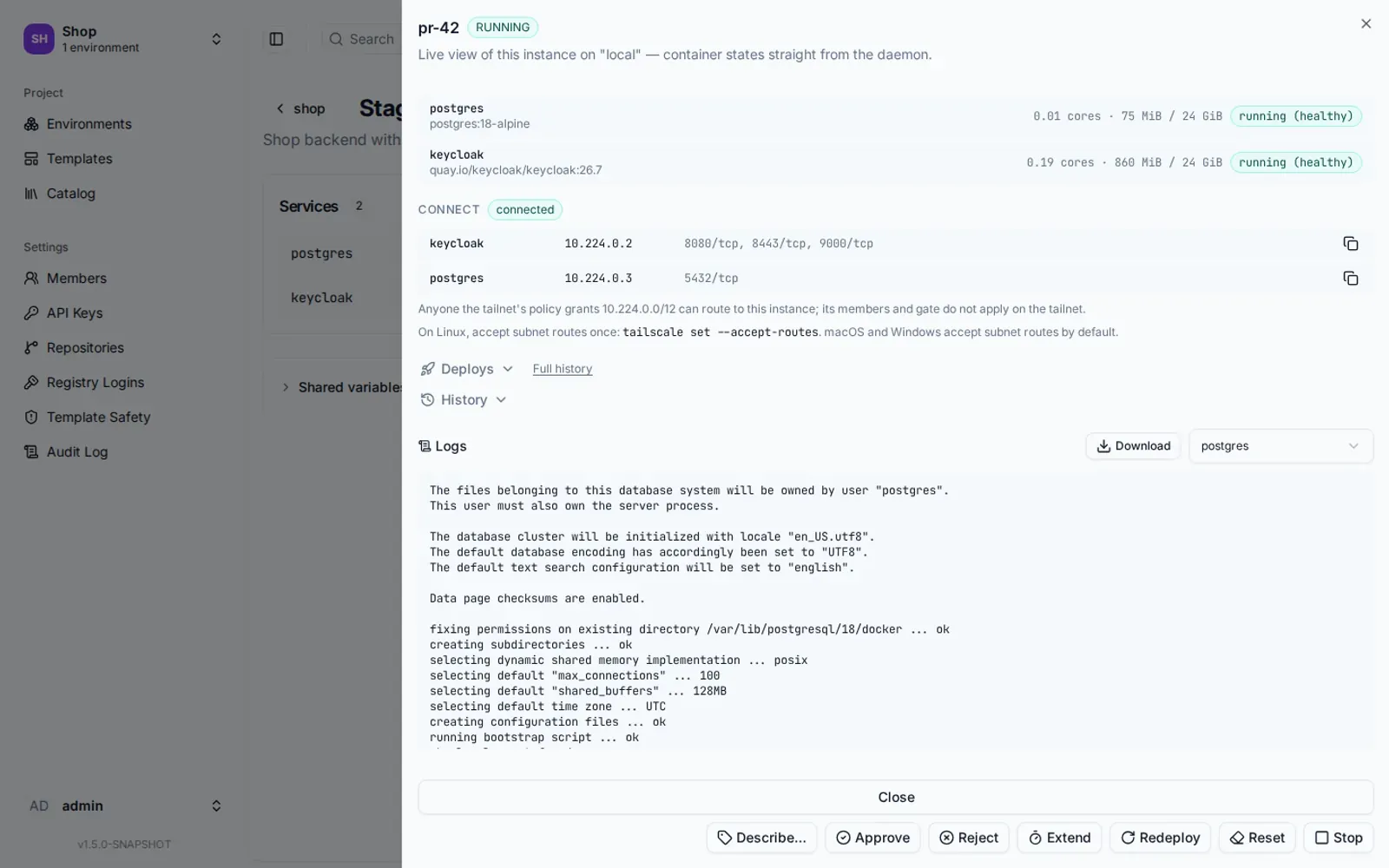
With the tailnet, every service also has a fixed address of its own.
The questions you’re about to ask
Do I need a VPN? No. fadebox connect reaches your environment through Fadebox itself, over
the same HTTPS address you open in the browser.
Is my environment’s database now open to the world? No. Nothing in the environment is published. Every connection is checked against the project’s roles when it opens, and recorded in the audit log.
What about Kafka, which tells clients where to reconnect? The catalog’s Kafka and Redpanda
templates carry a second listener for exactly this, on localhost:19092. Connect one broker per
laptop at a time.
My laptop is on Windows. The CLI comes for Windows, macOS and Linux, on Intel and ARM alike. Your Fadebox serves the right one from its sidebar.
What happens when the environment is stopped? connect tells you so and exits, rather than
leaving you with ports that lead nowhere.
Get your team on it
For your Fadebox admin it’s a short checklist, and on Fadebox 1.5 it’s on by default:
- Set the public URL to the address your Docker hosts can reach your Fadebox at.
- Let WebSockets through the reverse proxy in front of Fadebox. Most proxies do it out of the box; the reverse proxy guide covers nginx and HAProxy.
- Check the System page. The Instance agent card says whether everything is in place.
Then every developer downloads the CLI from your Fadebox, runs fadebox login, and gets an
environment of their own. The native access guide has the details.